


Best Keyboards for Home Studios (2026): 9 Picks for Every Budget
From pocket MIDI controllers to full workstations, these are the 9 best keyboards for home studios in 2026, with pros, cons and who each one is for.

Affiliate disclosure: The Metalverse is reader-supported. If you buy through links on this page, we may earn a commission at no extra cost to you. Picks are chosen by our editors and are never paid placements.
Choosing a keyboard for a home studio gets confusing quickly. You have MIDI controllers that make no sound on their own, digital pianos with speakers built in, and workstations that can run an entire song without a computer. They're all called "keyboards," but they do very different jobs.
We narrowed things down to the nine best keyboards for home studios in 2026, from a $100 desktop controller to a full workstation. Each one is the best at something specific.
Quick picks: the best home studio keyboards
- Best overall: Novation Launchkey 61 MK4, the best mix of keys, pads, faders and DAW control for the money
- Best budget / small desk: Akai MPK Mini IV, a full production toolkit in a 25-key footprint
- Best budget 88-key: Nektar Impact LX88+, the cheapest sensible way to get all 88 keys
- Best premium controller: Arturia KeyLab 61 mk3, a pro build with the best synth-preset integration
- Best weighted 88-key controller: Arturia KeyLab 88 mk3, a Fatar hammer-action keybed with full DAW control
- Best for orchestral & symphonic metal: Native Instruments Kontrol S61 MK3, with polyphonic aftertouch and deep Kontakt integration
- Best digital piano for a home studio: Roland FP-30X, a real piano feel plus a USB audio interface
- Best stage synth for bands: Roland Juno-D6, with 3,800+ sounds, a vocoder and power from a USB-C battery bank
- Best workstation: Roland Fantom-06, a full production studio built into one keyboard
In this guide
- Quick picks
- Comparison table
- The best keyboards for home studios, reviewed
- Also worth considering
- How to choose a keyboard for your home studio
- What metal & rock producers should prioritize
- How we chose
- FAQ
- Final verdict
The best keyboards for home studios, reviewed
Best overall
1. Novation Launchkey 61 MK4
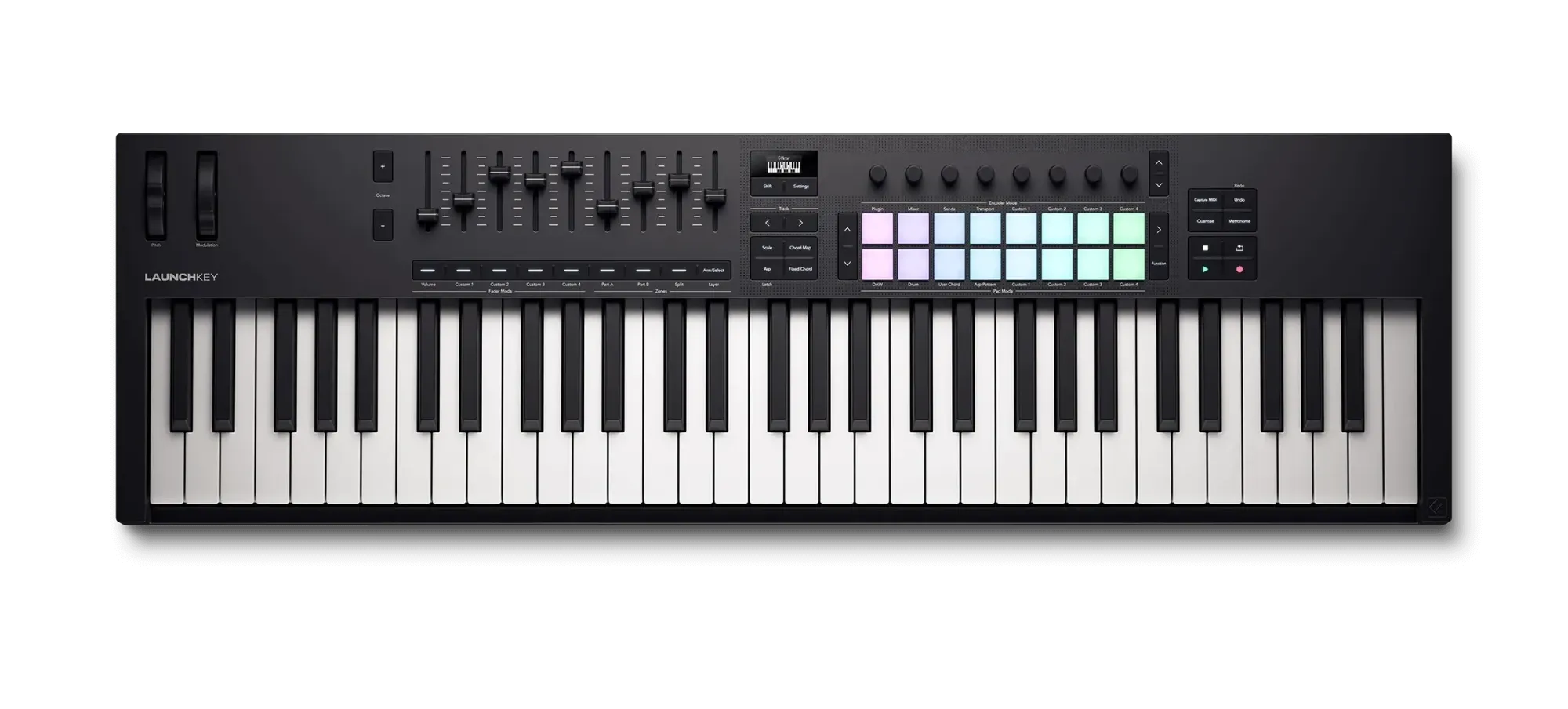
- Keys: 61 full-size, semi-weighted
- Controls: 16 RGB pads, 8 encoders, 9 faders
- Display: OLED screen
- Connectivity: USB-C, 5-pin MIDI out, sustain
- Weight: 4.78 kg / 10.5 lb
- Price: $300–$330
Why it's our top pick: The Launchkey 61 MK4 does everything most home studios need, and it costs a fraction of what the premium controllers on this list do. You get five octaves of full-size semi-weighted keys, which is enough for two-handed parts. There are 16 velocity-sensitive pads for drums, plus a full bank of faders and encoders for mixing and plugin tweaks. It sits at about 35 inches wide, so it still fits on a normal desk.
The MK4 generation added useful writing tools. Scale mode keeps you in key. Chord Map puts chord progressions under the pads. There's a built-in arpeggiator, and you can split the keyboard for bass and lead parts. Novation's DAW integration is strongest with Ableton Live, but scripts also cover Logic Pro, FL Studio, Cubase, Reaper, Reason and more. The 5-pin MIDI out means it can control a hardware synth too. The pads add polyphonic aftertouch, which is a nice touch for finger drumming and textures.
Pros
- Full-size semi-weighted keys at a mid-range price
- Pads, faders and encoders cover beatmaking and mixing
- Scale, chord and arp modes help songwriting
- Broad DAW support plus a generous software bundle
- 5-pin MIDI out for hardware synths
Cons
- The small OLED screen hides some deeper features
- Integration with DAWs other than Ableton is less deep
- No CV/gate for modular gear
- Semi-weighted keys won't satisfy trained pianists
Buy it if: you want one controller that handles keys, drums and mixing without overspending.
Skip it if: you mainly play piano parts and need weighted hammer action (see the KeyLab 88 mk3 or FP-30X).
Also comes in 25, 37 and 49-key sizes.
Best budget & small desks:
2. Akai MPK Mini IV
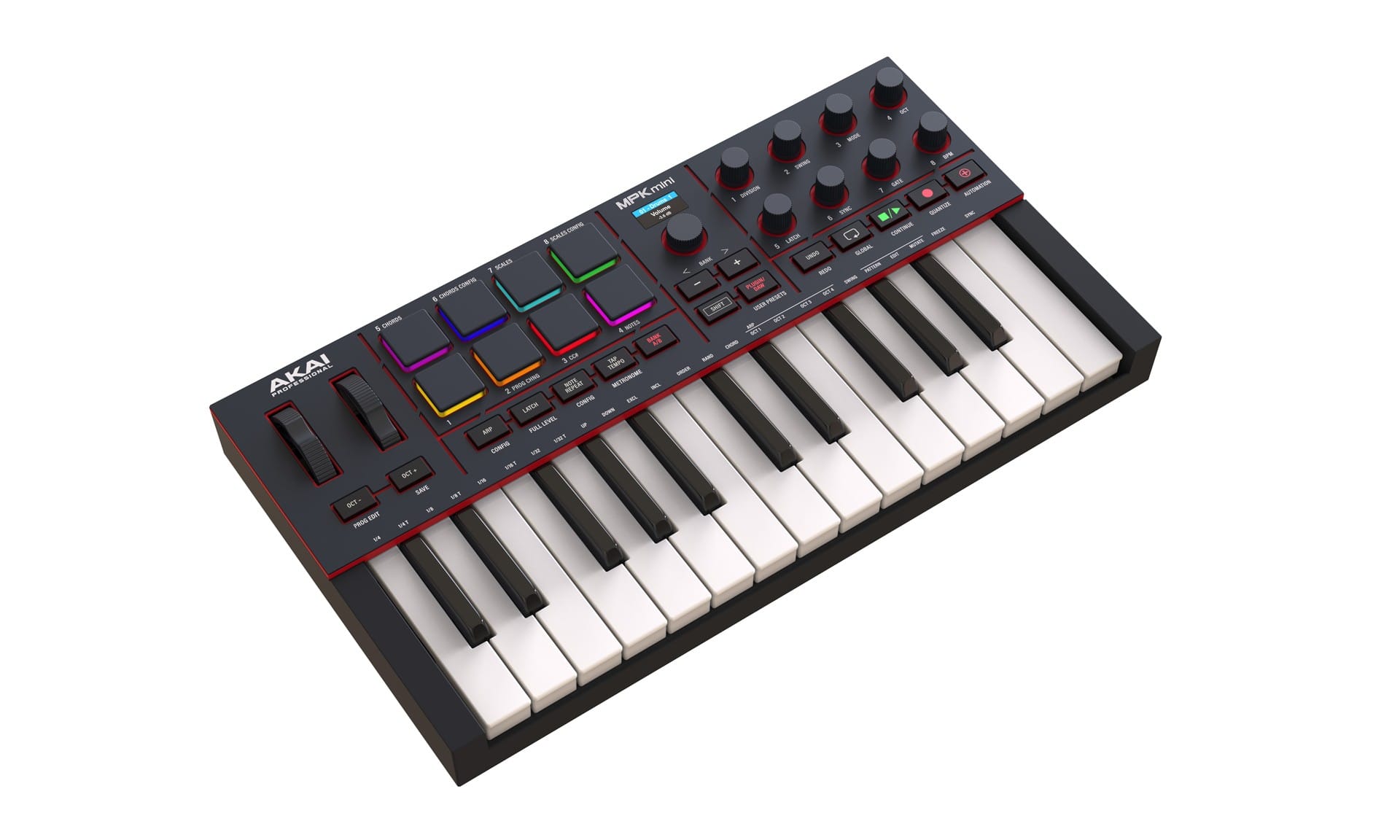
- Keys: 25 mini, velocity-sensitive
- Controls: 8 MPC-style pads, 8 knobs
- Display: Color screen
- Connectivity: USB-C, 5-pin MIDI out
- Extras: Pitch & mod wheels, arpeggiator
- Approx. price: $100–$120
Why we picked it: The MPK Mini has been the default first controller for years, and the fourth generation fixes the old version's biggest complaints. The awkward thumbstick is gone, and real pitch and mod wheels replace it. A color screen shows what each knob is doing. There's a proper 5-pin MIDI out, so it can drive a hardware synth as well as your DAW. The eight MPC-style pads are still the best part, and they're very good for programming drums at this price.
It's the right pick if your "studio" is a laptop on a small desk, or if you need a second controller that fits in a backpack.
Pros
- Very affordable and very portable
- Excellent pads for its size
- New pitch and mod wheels plus a color screen
- MIDI out for hardware synths
Cons
- Only two octaves of mini keys
- No aftertouch
- Hard to play two-handed parts
Buy it if: you're starting out, short on space, or mostly program beats and basslines.
Skip it if: you play with both hands. A 49- or 61-key board will serve you better.
Best budget 88-key
3. Nektar Impact LX88+
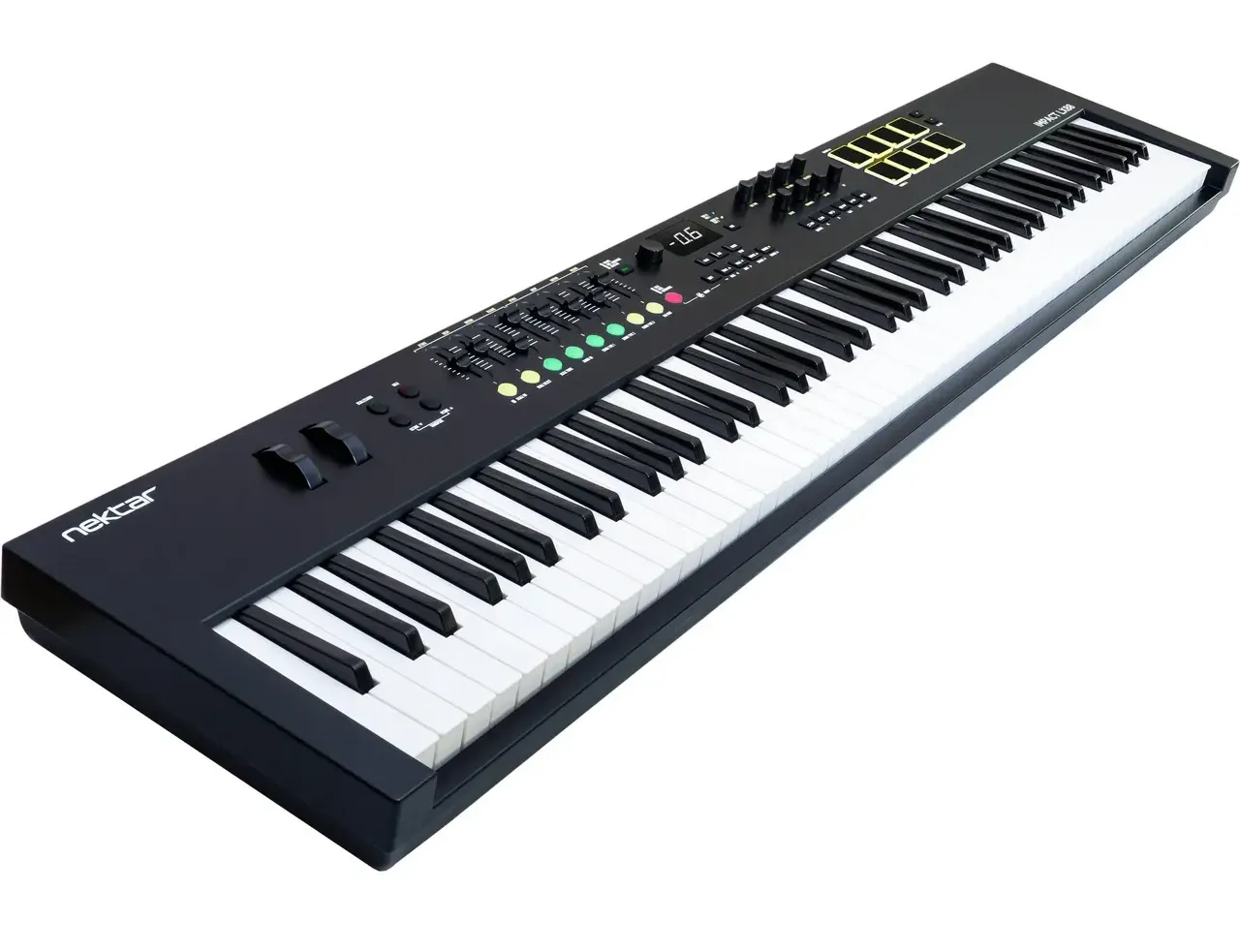
- Keys: 88 full-size, semi-weighted
- Controls: 8 pads, 8 encoders, faders
- Power: USB bus-powered
- DAW integration: Pre-mapped for most major DAWs
- Approx. price: $280–$320
Why we picked it: Some parts need the full range, like a piano intro or a big orchestral voicing that runs from low bass to high strings. The LX88+ gets you all 88 keys for about the price of a mid-size controller. It still includes pads, faders, and encoders. Nektar's DAW integration is some of the best in this price range, and the transport and mixer controls work right away in most major DAWs.
Pros
- Lowest-cost full 88-key range worth buying
- Good DAW integration for the price
- Quiet keys, USB-powered
Cons
- Semi-weighted, not true piano feel
- Takes up a lot of desk space
- Build is plasticky compared with premium boards
Buy it if: you need full range for orchestral or piano parts on a tight budget.
Skip it if: you're a pianist who needs hammer action. Save up for the KeyLab 88 mk3 or the FP-30X.
Best premium controller
4. Arturia KeyLab 61 mk3
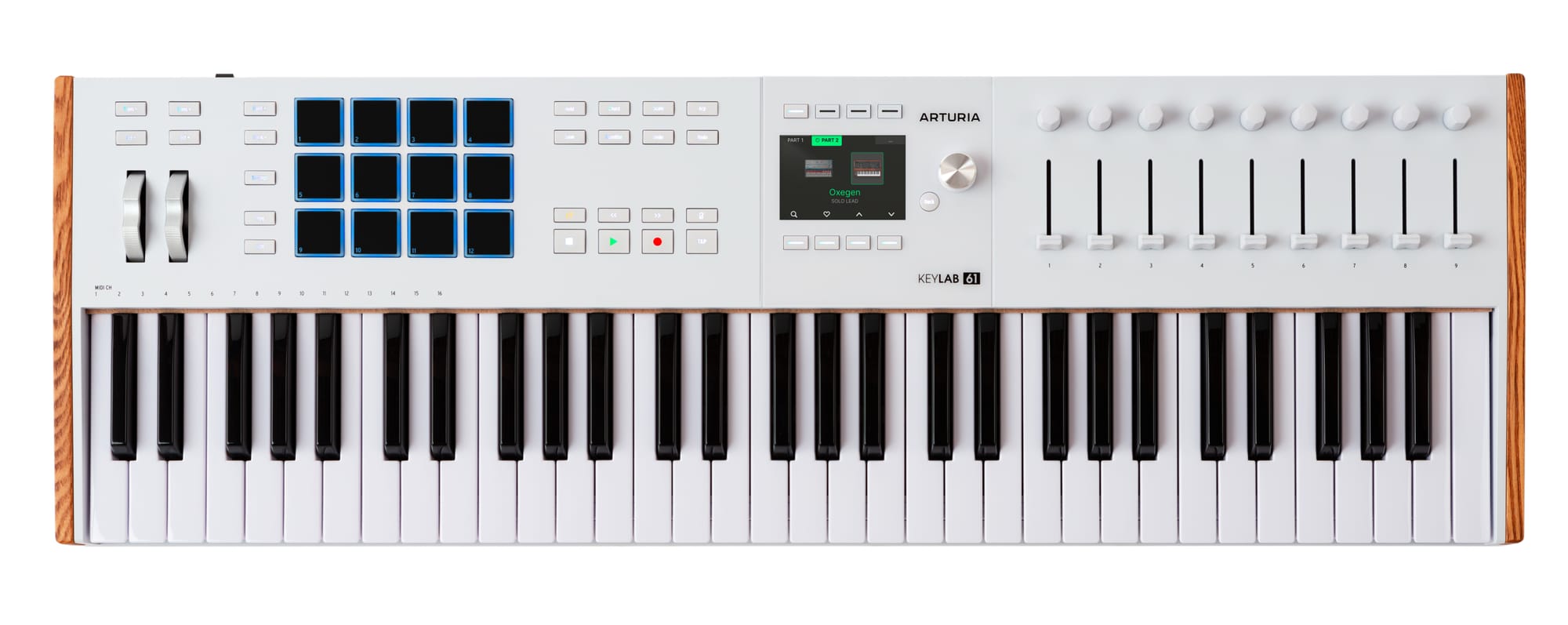
- Keys: 61 semi-weighted, aftertouch
- Controls: 12 pressure-sensitive pads, 9 faders, 9 encoders
- Display: 3.5" color screen
- Connectivity: USB-C, MIDI in/out, 3 pedal inputs
- Software: Analog Lab Pro, Ableton Live Lite + more
- Approx. price: ~$600
Why we picked it: The KeyLab mk3 is the controller to get if you want something that feels like a real instrument. It has an aluminum body, wood end panels and a quiet, smooth keybed with aftertouch. The 3.5-inch color screen shows parameter names as you turn the knobs, so you don't have to look back at the monitor constantly. The bundled Analog Lab Pro gives you more than 2,000 synth, keys and pad presets, and they're mapped to the hardware from the start.
DAW integration covers Ableton Live, Logic Pro, Cubase, FL Studio and Bitwig. Touch-sensitive faders and encoders mean the screen jumps to whatever you touch.
As someone who's owned multiple Arturia keyboards, their Keylab series is excellent and has some of the best build quality out of any of the keyboards we've tried.
Pros
- Premium build and excellent keybed with aftertouch
- Color screen makes deep control usable
- Analog Lab Pro bundle is great value
- Full MIDI in/out and three pedal inputs
Cons
- 12 pads versus 16 on the MkII
- Glossy screen picks up fingerprints
- About twice the price of the Launchkey
Buy it if: you want a controller you won't outgrow and you like to design sounds with synth plugins.
Skip it if: the Launchkey already covers what you need. Its extra features don't make you play better.
Check price at Sweetwater | Check price on Amazon
Also comes as a 49-key model. The budget-friendly KeyLab Essential mk3 line drops the premium build and screen size but keeps much of the workflow.
Best weighted 88-key controller
5. Arturia KeyLab 88 mk3
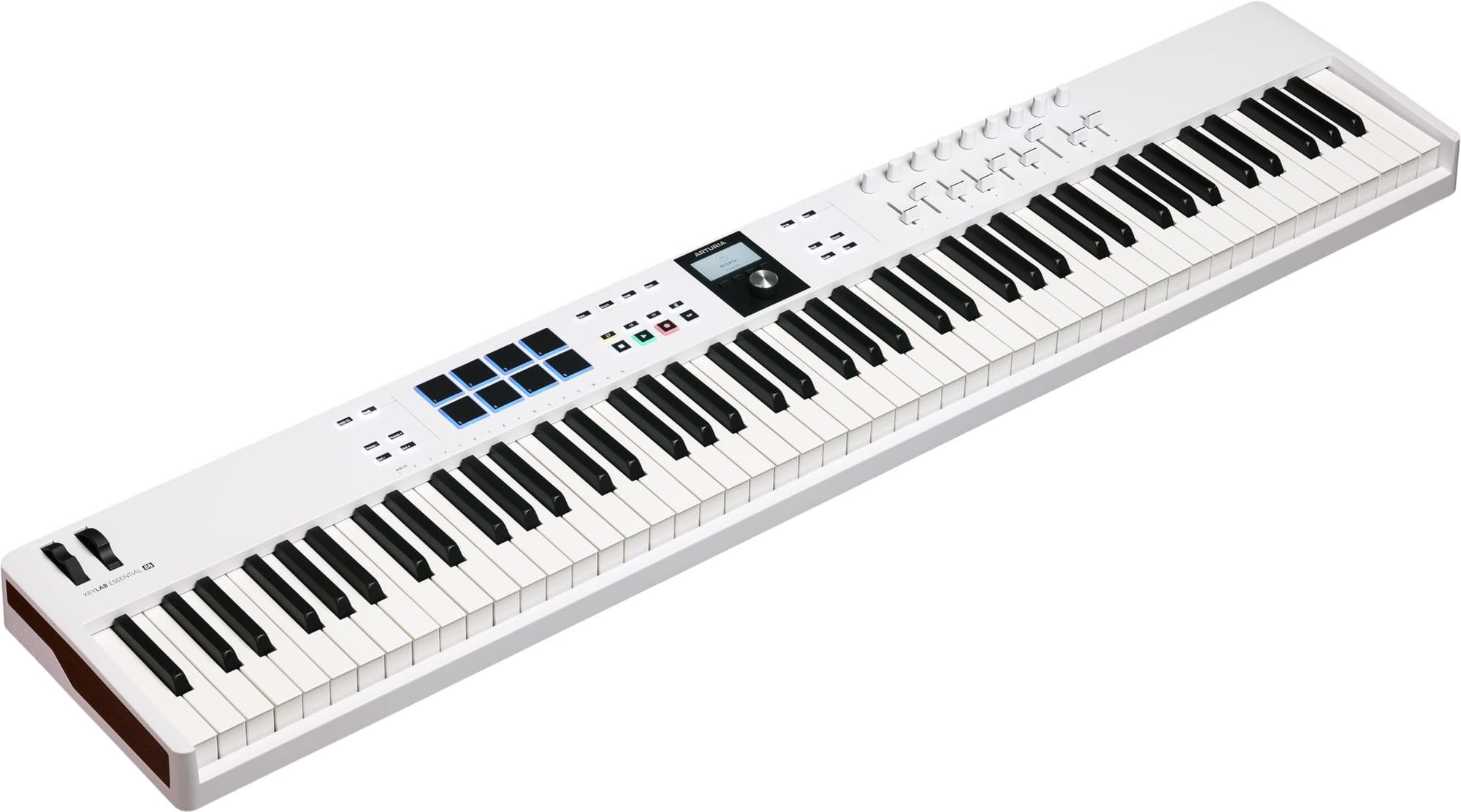
- Keys: 88 Fatar TP/110 hammer action, aftertouch
- Controls: 12 pressure-sensitive pads, 9 faders, 9 encoders
- Display: 3.5" color screen
- Software: Analog Lab Pro, Ableton Live Lite
- Approx. price: $900–$1,000
Why we picked it: Most weighted 88-key controllers make you choose between a good piano action and good DAW control. The KeyLab 88 mk3 gives you both. Its Fatar TP/110 hammer-action keybed is the kind found in much more expensive stage instruments, and it carries over the full mk3 control surface: pads, faders, encoders, the color screen and Analog Lab Pro. If piano is your main instrument and you produce in a DAW, this is the one to get.
Pros
- Real hammer-action Fatar keybed
- Full controller feature set, not a bare piano controller
- Strong software bundle
Cons
- Heavy, with a large footprint
- Channel aftertouch only, no polyphonic aftertouch or MPE
- Pricey if you don't need weighted keys
Buy it if: you're a pianist who also wants hands-on DAW control from one keyboard.
Skip it if: you mostly play synth lines. Weighted keys slow down fast leads.
Best for orchestral & symphonic
6. Native Instruments Kontrol S61 MK3
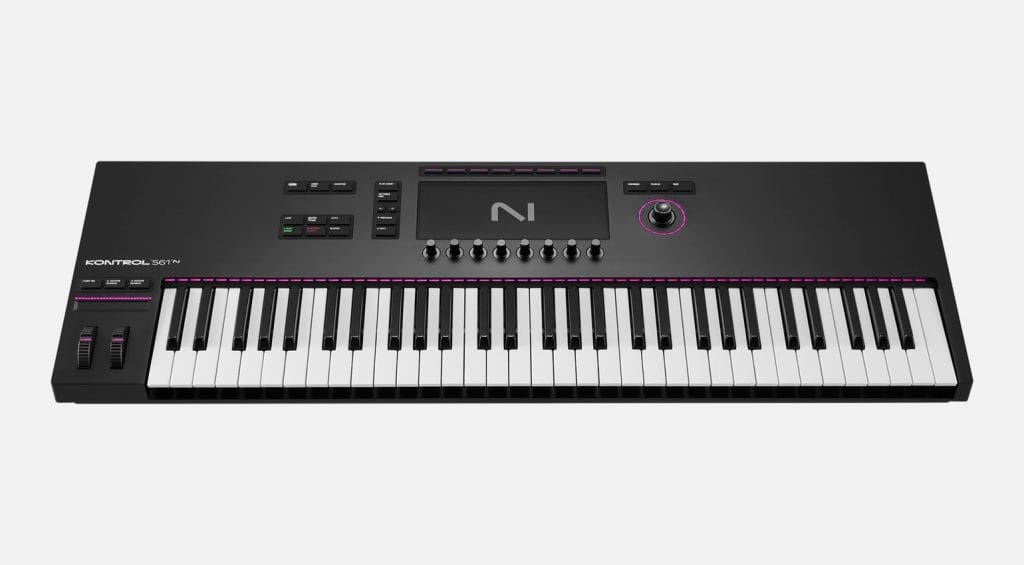
- Keys: 61 Fatar semi-weighted, polyphonic aftertouch
- Display: Full-color high-res screen
- Extras: Light Guide above every key, touch-sensitive metal encoders
- Connectivity: USB-C, MIDI, 4 pedal inputs
- Software: Komplete Select bundle, Ableton Live Lite
- Approx. price: $850
Why we picked it: If you build orchestral arrangements in Kontakt, nothing else on this list fits your workflow as well. The S61 MK3 browses NKS libraries directly from its screen. The Light Guide shows key switches and playable ranges above each key. Most importantly, it has polyphonic aftertouch as standard, so you can press harder into a single note in a chord to swell one string line while the others hold steady.
Pros
- Polyphonic aftertouch on a quality Fatar keybed
- Best-in-class Kontakt / NKS browsing and control
- Light Guide is very useful for key switches
- Premium build and screen
Cons
- Far less useful outside the NI ecosystem
- User reviews are mixed on software stability and generic MIDI flexibility
- Expensive for 61 keys
Buy it if: you already own Kontakt libraries (or Komplete) and write orchestral, cinematic, or symphonic parts.
Skip it if: you rely on non-NI plugins or want a general-purpose controller. The KeyLab 61 mk3 is more flexible.
Also comes as the S49 MK3 (semi-weighted) and S88 MK3 (hammer action).
Best digital piano for home studios
7. Roland FP-30X
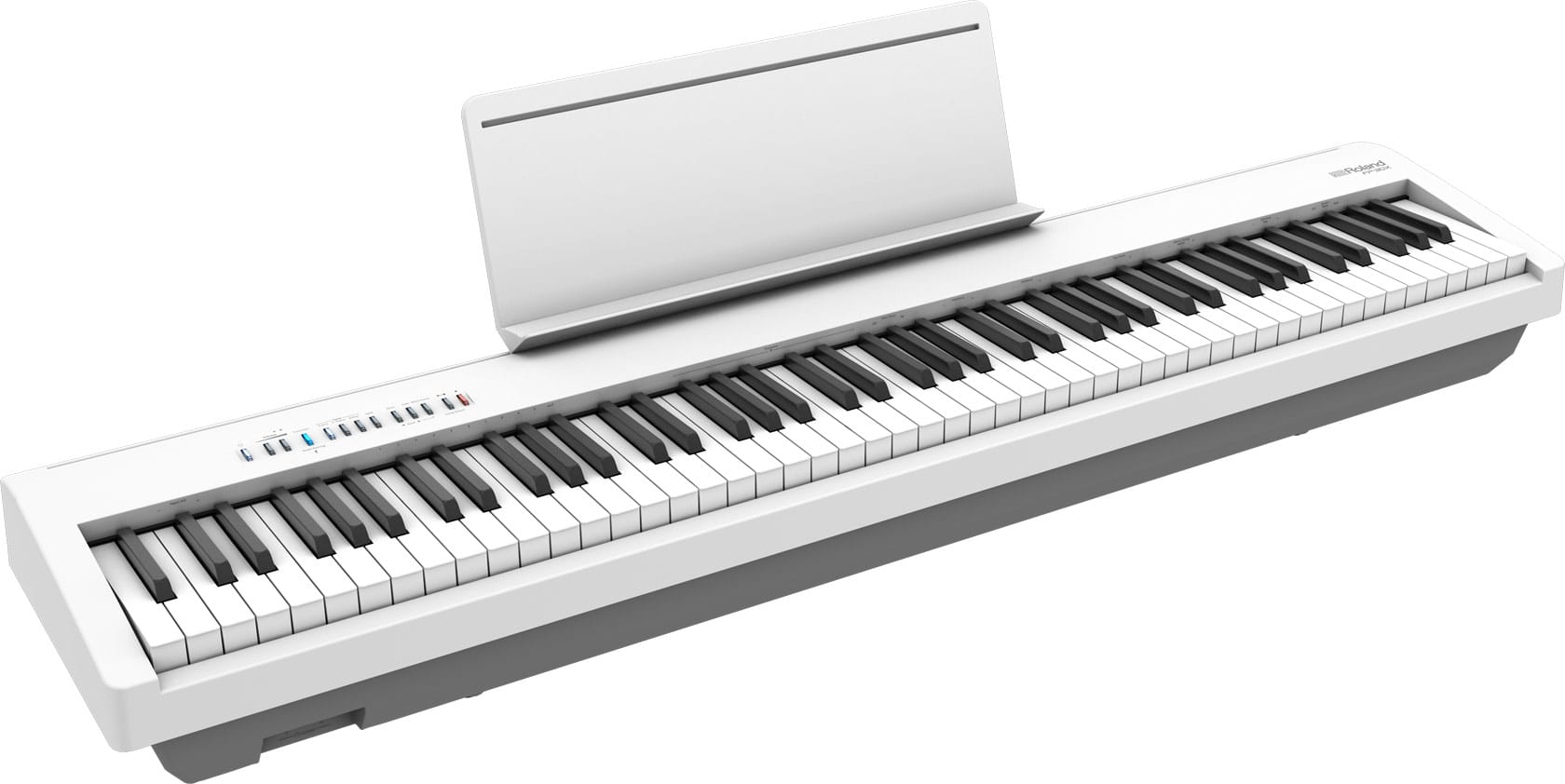
- Keys:88 PHA-4 Standard hammer action, ivory feel
- Sound: SuperNATURAL Piano, 256-voice polyphony
- Speakers: 2 × 11 W
- Connectivity: USB audio + MIDI, Bluetooth MIDI/audio, 1/4" line outs
- Weight: 14.8 kg / 32.6 lb
- Approx. price: $600–$800
Why we picked it: Some people need a piano that can also record, more than a controller with lots of knobs. The FP-30X is a real instrument you can sit and practice on with no computer running. Its PHA-4 Standard hammer action is one of the most respected keybeds at this price. It also covers the studio side well. The built-in USB audio interface sends its piano sound straight into your DAW. USB MIDI lets it play any virtual instrument. Bluetooth MIDI works with tablet apps, and dedicated 1/4" outputs connect to monitors or a mixer.
I personally own and use a Roland FP30x regularly. It has one of the most realistic-feeling keybeds that feels the closest to an acoustic piano at the price range.This keyboard is an excellent option for anyone who can't afford a grand piano, or needs a quieter practice option. Definitely recommend.
Pros
- Excellent hammer-action feel for the money
- Records audio or MIDI over a single USB cable
- Playable without a computer, with built-in speakers
- Proper line outs plus Bluetooth MIDI
Cons
- No pads, faders or knobs for DAW control
- Built-in speakers can sound boxy at low volume
- Only 56 onboard sounds, and the included pedal is basic
Buy it if: piano is your main instrument and you want one keyboard for both practice and recording.
Skip it if: you mainly produce electronic or beat-based music. A controller with pads makes more sense.
Best stage synth for bands
8. Roland Juno-D6
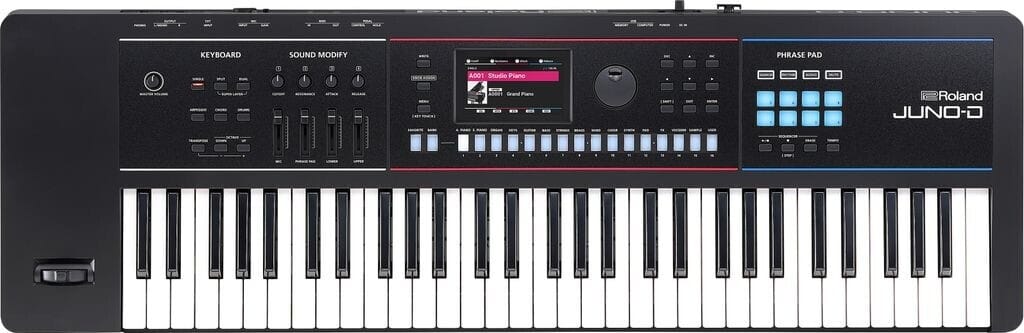
- Keys: 61 synth-action, velocity-sensitive
- Engine: ZEN-Core, 3,800+ sounds, 95+ drum kits
- Extras: Vocoder + mic input, 8-track pattern sequencer, WAV/AIFF sample import
- Connectivity: USB-C audio/MIDI interface
- Power: AC or USB-C battery bank
- Weight: 5.8 kg / 12.8 lb
- Approx. price: ~$1,000
Why we picked it: The Juno line has been the working keyboardist's gig synth for two decades, and the Juno-D6 (which replaced the long-running Juno-DS) is the best version yet. It runs Roland's flagship-class ZEN-Core engine with more than 3,800 sounds. It weighs under 13 lb, and it can run from a USB-C power bank, so you can rehearse anywhere. At home, the class-compliant USB-C audio/MIDI interface records its sounds straight into your DAW. In the rehearsal room, everything you need is one button away.
Pros
- Huge, gig-ready sound library
- Light enough to carry, and runs on battery power
- Vocoder, mic input, and sequencer built in
- USB-C audio interface for home recording
Cons
- Not as deep as a Fantom or MODX for sound design
- Some longtime Juno users miss tones from earlier models
- Roland's bender lever instead of wheels (a matter of taste)
Buy it if: you play keys in a band and also want to record at home with one instrument.
Skip it if: you only produce in a DAW. A controller plus plugins goes further for the money.
Also comes as the 76-key Juno-D7 and the 88-key, weighted Juno-D8.
Best workstation
9. Roland Fantom-06
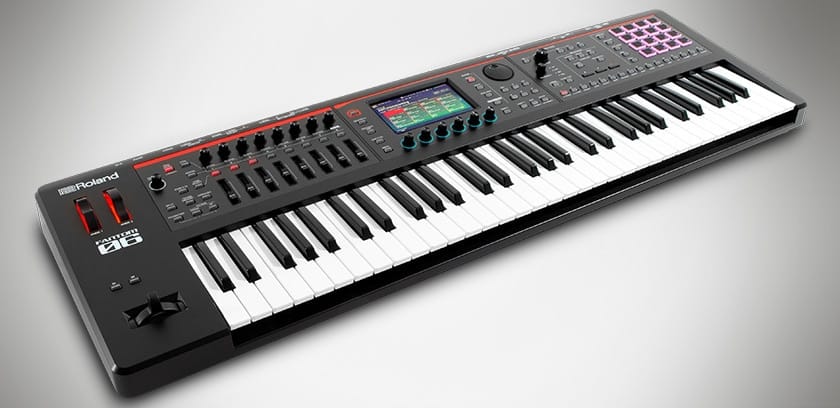
- Keys: 61 synth-action, velocity-sensitive
- Engine: ZEN-Core, SuperNATURAL Acoustic & EP, Virtual ToneWheel organ; 3,500+ tones
- Production: 16-track sequencer, TR-REC drum programming, keyboard + pad sampler
- Controls: Touchscreen, 16 RGB pads, knobs & sliders
- Interface: 24-bit/96 kHz USB audio; Logic, MainStage & Ableton integration
- Approx. price: $1,400–$1,800
Why we picked it: The Fantom-06 is closer to a complete studio than a keyboard. It builds Roland's flagship Fantom sound engine into a 6 kg, 61-key body. You get a 16-track sequencer with clip-based recording and TR-style drum programming. It samples both across the keyboard and on 16 RGB pads, and it doubles as a 24-bit/96 kHz audio interface. It also integrates natively with Logic Pro, MainStage, and Ableton Live, so it can act as a sound module and controller for your DAW. For players who want to write away from the computer and then finish the track in a DAW, it's the most capable keyboard here.
The Roland Fantom 06 is my choice of keyboard for live performance and recording. There is an incredible amount of sound design choices, the scene feature allows you to create lists of dozens of tones for live use, and it gives you pretty much every feature you could need.
Pros
- Flagship-class sounds in a portable body
- Write full songs with no computer
- Deep sampling plus TR-style drum programming
- Strong DAW integration and a built-in audio interface
Cons
- Synth-action keys only (weighted keys need the Fantom-08)
- Steep learning curve
- Expensive if you'd mostly use it as a controller
Buy it if: you want a single instrument for writing, performing, and producing, with or without a DAW.
Skip it if: you already do everything in a DAW with plugins. A controller and a few plugins cost far less.
Also comes as the 76-key Fantom-07 and the 88-key, weighted Fantom-08.
Also worth considering
- Arturia KeyLab Essential 88 mk3 (~$400): a step up from the Nektar with a color screen, nine faders and Analog Lab included. The keys are still semi-weighted.
- Native Instruments Kontrol S88 MK3 (~$1,300): everything we like about the S61, plus fully weighted hammer action. It's the dream board for pianists who live in Kontakt.
- Yamaha MODX M6 (~$1,800+): the Fantom-06's main rival, with AWM2, FM-X and AN-X engines on a semi-weighted keybed and a 10-in/4-out USB audio interface. Pick it if you love Yamaha's sound and FM synthesis.
- Expressive E Osmose 49 CE: keys you can press deeper and wiggle side to side for MPE-style expression. It's a specialist tool for cinematic and ambient sound designers. Check price
- M-Audio Keystation 49 MK3 (~$100–$130): a bare-bones 49-key controller for people who just want keys and nothing else.
How to choose a keyboard for your home studio
1. Decide what kind of keyboard you need
This choice matters more than any spec on this page:
- MIDI controller: makes no sound by itself. It plays virtual instruments in your DAW and controls your mix. It's the best value for computer-based production. (Launchkey, MPK Mini, KeyLab, Kontrol, Nektar)
- Digital piano: has built-in sounds and speakers, and is designed around a realistic piano action. Best if piano is your main instrument. (FP-30X)
- Synthesizer / stage keyboard: has built-in sounds designed for performing. Best if you play live in a band. (Juno-D6)
- Workstation: a synth plus sequencer, sampler, and audio interface. You can produce full songs without a computer. (Fantom-06)
2. How many keys do you need?
- 25 keys: basslines, simple melodies, and drum programming. Fits anywhere.
- 37–49 keys: chords plus a melody. A good balance for small desks.
- 61 keys: the sweet spot for most producers. Five octaves covers two-handed playing without taking over the room.
- 88 keys: full piano range. Essential for pianists and handy for wide orchestral voicings, but it needs serious desk space.
3. Synth-action, semi-weighted or weighted?
- Synth-action: light and springy. Fast for leads, basslines, and pad playing.
- Semi-weighted: a bit more resistance, a good all-rounder, and what most controllers use.
- Weighted / hammer action: mimics an acoustic piano. Essential for piano technique, slower for synth lines.
4. Expression: aftertouch, poly AT and MPE
Aftertouch lets you add vibrato, filter sweeps or swells by pressing into a key after it's down. Channel aftertouch (KeyLab mk3) applies one value to all held notes. Polyphonic aftertouch (Kontrol MK3) and MPE (Osmose) respond to each note separately. If you write expressive strings, pads or synth leads, this is worth paying for. For drums and basslines, it isn't.
5. DAW integration and controls
Good integration means the transport, mixer, and plugin controls work without manual mapping. Check that your DAW is supported. Ableton Live, Logic Pro and FL Studio have the deepest support across brands. Pads matter if you program drums, and faders matter if you mix with your hands.
6. Connectivity and desk space
Want to control hardware synths? Get 5-pin MIDI out. Want to record a keyboard's own sounds? Look for a built-in USB audio interface (FP-30X, Juno-D6, Fantom-06). Finally, measure your desk. A 61-key board is about 35–40 inches wide, and an 88-key board is about 50 inches or more.
Frequently asked questions
What is the best keyboard for a home studio?
For most people, the Novation Launchkey 61 MK4 is the best home studio keyboard. It combines 61 semi-weighted keys, drum pads, faders, and broad DAW integration at a mid-range price. Pianists should look at the Arturia KeyLab 88 mk3 or the Roland FP-30X, and players who want to produce without a computer should look at the Roland Fantom-06.
How many keys do I need for music production?
61 keys is the sweet spot for most producers, since it's enough for two-handed parts without taking over your desk. 25–49 keys work for beats, basslines, and small spaces. Go for 88 keys if you're a trained pianist or write wide orchestral parts.
Should I get weighted or semi-weighted keys?
Choose weighted (hammer-action) keys if you play piano seriously, because they build and preserve proper technique. Choose semi-weighted if you mainly play synths, pads and basslines, or switch between styles. They're faster to play and lighter on your desk.
Is a MIDI keyboard or a digital piano better for a home studio?
A MIDI keyboard is better if you produce in a DAW, since it controls every virtual instrument and your mix for less money. A digital piano is better if piano is your main instrument and you want to practice without a computer. Models like the Roland FP-30X work as both, thanks to USB MIDI and a built-in audio interface.
Can I use a digital piano or synth as a MIDI controller?
Yes. Most modern digital pianos and synths send MIDI over USB, so they can play software instruments in your DAW. What you lose is hands-on control, because pianos rarely have pads, faders or transport buttons.
Do MIDI keyboards make sound on their own?
No. A MIDI controller only sends note and control data. You need a computer, tablet or hardware sound module running an instrument to hear anything. If you want built-in sounds, choose a digital piano, synth or workstation.
Do I need aftertouch?
Not for drums, basslines or simple chords. It's worth having if you play expressive strings, pads or synth leads, because pressing into a key can add vibrato, swells or filter movement. Polyphonic aftertouch, which controls each note separately, is the most expressive option.
What's the best keyboard for metal and orchestral metal production?
For symphonic and orchestral metal, the Native Instruments Kontrol S61 MK3 is our pick thanks to polyphonic aftertouch and deep Kontakt integration. For programming drums and synth layers on a budget, the Novation Launchkey 61 MK4 is the best value. For playing keys live in a metal band, go with the Roland Juno-D6 or Fantom-06.
Final verdict
If you only buy one keyboard for your home studio, make it the Novation Launchkey 61 MK4. It covers playing, beatmaking and mixing for around $300. Tight on space or money? The Akai MPK Mini IV is still the best place to start. Pianists should go to the Arturia KeyLab 88 mk3 (DAW-first) or the Roland FP-30X (piano-first). If you want an instrument that can write the whole song by itself, the Roland Fantom-06 is the most complete studio-in-a-keyboard you can buy.
Thanks for reading!
- Read more of the latest rock/metal news here
- Find our latest headphone, music, and audio gear reviews here
- Subscribe to our Metal News Email list for weekly updates!
- Support The Metalverse and go ad-free.
- Follow us on Social Media | Instagram | Facebook
- Listen to our metal Spotify Playlists!
- Join our free 5-day music marketing email course!


